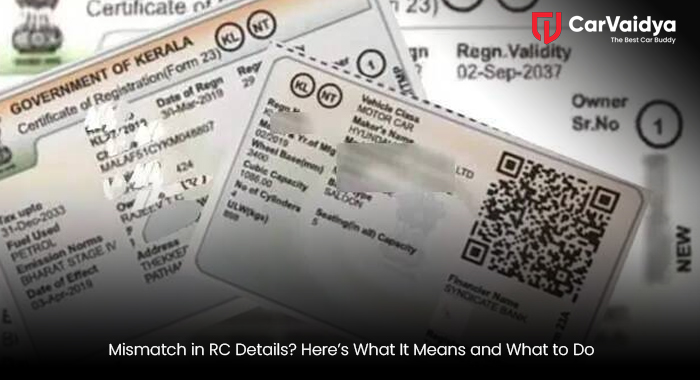
If you own a car or bike in India, your Registration Certificate (RC) is one of the most important documents. It proves that the vehicle belongs to you and is legally registered. But many vehicle owners face a common issue today – RC details mismatch. Sometimes, the name is incorrect, the engine number is incorrect, or the address does not match. These small mistakes can later lead to significant troubles.
In this blog, we will explain what a mismatch in vehicle registration details means, why it happens, and how you can fix it easily. So, if you are worried about wrong RC details in India, keep reading.
What Is RC Details Mismatch?
RC details mismatch means the information mentioned on your Registration Certificate does not match the actual vehicle or owner records. This could be related to:
- Owner name spelling mistake
- Wrong address
- Incorrect engine or chassis number
- Wrong fuel type (Petrol/Diesel/CNG/EV)
- Vehicle color mismatch
- Vehicle ownership mismatch
Many people ignore these errors, thinking they are not a big issue. But later, it creates problems during resale, insurance claim, loan transfer, or even police checks.
Common Reasons for Mismatch in Vehicle Registration Details
There are many reasons why RC mismatch happens. Some of the common ones are:
1. Data Entry Mistake at RTO
During registration, RTO staff may enter the wrong details by mistake. Even a small spelling error can lead to the RC correction process later.
2. Dealer Registration Error
Sometimes, the dealer submits incorrect information while registering your new vehicle. As a result, wrong RC details get printed.
3. Address Change Not Updated
If you changed your house and didn’t update RC at RTO, your old address remains on the records. This leads to a mismatch.
4. Ownership Transfer Issues
During resale, if the ownership transfer is not done properly, a vehicle ownership mismatch happens. The RC may still show the old owner's name.
5. Modification Not Updated
If you installed a CNG kit, changed color, or converted fuel type, and didn’t inform RTO, your RC data becomes outdated.
Problems Due to RC Mismatch
Many people don’t realise how serious RC mismatch can be. Here are some major problems due to RC mismatch:
- Difficulty in selling your vehicle
- Insurance claims may get rejected
- Loan or hypothecation issues
- Trouble during police verification
- Issues in FASTag and toll services
- Delay in fitness or permit renewal
In some cases, you may even face legal trouble if RC data does not match official records.
Why Car RC Verification Is Important
- Owner details
- Registration date
- Insurance status
- Pollution validity
- Blacklist status
- Pending challans
You can do this online using the VAHAN portal or through professional platforms like CarVaidya, which also helps in detailed vehicle inspection and documentation support.
Using CarVaidya services reduces the chances of future RC-related problems.
How to Fix RC Details: Step-by-Step Guide
If you have found a mismatch in RC details, don’t panic. You can easily correct it by following the RC correction process.
Step 1: Identify the Exact Error
First, check which detail is wrong – name, address, engine number, or anything else. Do proper car RC verification.
Step 2: Collect Required Documents
You will need:
- Original RC
- ID proof (Aadhaar, PAN)
- Address proof
- Insurance copy
- PUC certificate
Sale documents (if ownership-related)
Step 3: Visit Your Local RTO
Step 4: Pay Correction Fees
There is a small fee for RC correction. Amount may vary from state to state.
Step 5: Verification Process
RTO may physically inspect your vehicle, especially if the engine or chassis number is involved.
Step 6: Receive Updated RC
Online Method to Update RC Details
Nowadays, you can also start an RC update online through the Parivahan website. You can apply for correction, upload documents, and book an appointment. But still, final verification is done at RTO.
Online method saves time, but sometimes portal errors happen. So be patient while applying.
Tips to Avoid RC Mismatch in the Future
Here are some simple tips to avoid a mismatch in the future:
- Always check the RC after delivery of the new vehicle
- Do car RC verification every year
- Update the address immediately after shifting
- Complete ownership transfer within 14 days
- Inform RTO about any modifications
- Keep copies of all documents
Small care today can save you froma big headache tomorrow.
When Should You Take Professional Help?
If your case is complicated, like multiple ownership mismatches, missing records, or old vehicle data issues, professional help is useful. Platforms like CarVaidya guide you in the documentation, inspection, and RC correction process. This makes things faster and stress-free. Many people try doing everything alone and waste months. So sometimes, taking expert help is a better option.
Mismatch in RC details is a common problem in India, but it should never be ignored. Wrong RC details can lead to financial loss, legal trouble, and unnecessary stress. By doing regular car RC verification and following proper
RC update at the RTO process, you can stay safe. If you notice any mismatch in vehicle registration details, act quickly. Check documents, apply for correction, and keep your records clean. Your vehicle deserves proper identity, and so do you.
You can read some other articles
Common Myths About Used Car Warranties in India
Common Breakdown Situations Where Roadside Assistance Saves the Day
 By CarVaidya




0 Comments